
Directed QA App
2023
Created
for Kroger Technology
Digitizing produce inspections to improve efficiency, accuracy, and data visibility at scale
Kroger’s produce inspection process was still running on paper. Inspectors scribbled notes on pre-printed worksheets or scraps, then threw them away if the product was accepted. While Kroger tracked rejections in a digital form, there was no record of borderline cases that barely passed inspection—often a signal of lower quality suppliers.
Because Kroger’s distribution network grew through acquisitions, inspection methods also varied widely across regions. The business wanted to standardize the process, capture richer data, and gain visibility into supplier performance. They also wanted to take advantage of the Android-based TC-52 handhelds already in use across distribution centers.
I designed the Directed QA app to digitize and streamline inspections, normalize workflows, and deliver insights that were previously invisible.
I was the sole UX designer on the project, partnering closely with one product manager, a team of engineers, QA testers, and a scrum master. My responsibilities spanned discovery research, service design, workflow mapping, wireframing, prototyping, and handoff to development.
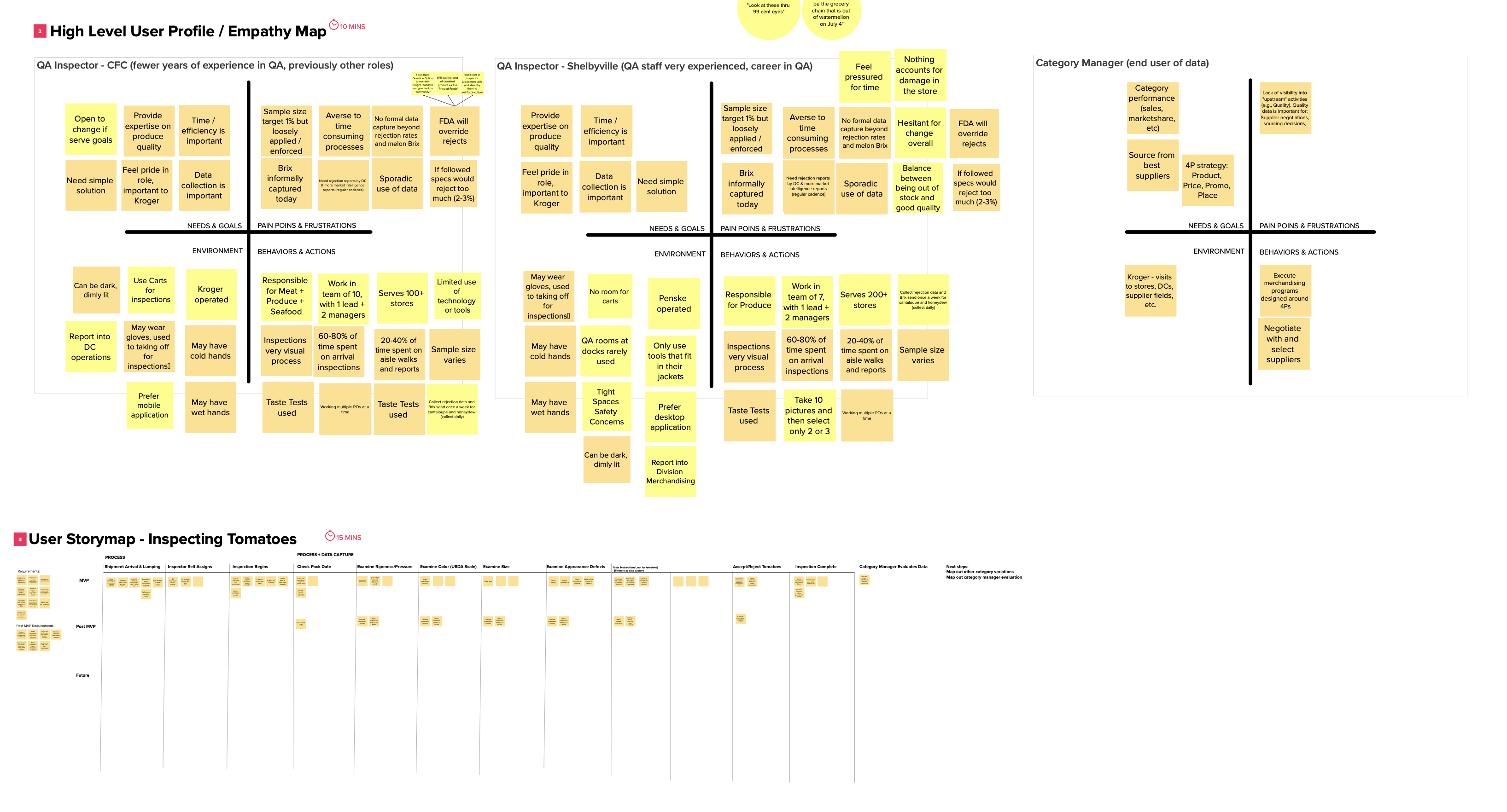
I began the project by interviewing eight inspectors and two inspection managers. These conversations gave me an overview of their responsibilities, tools, and frustrations. I then shadowed inspectors at two distribution centers for full workdays, observing how inspections fit into the broader workflow of receiving and moving produce through the warehouse. From these observations, I created a detailed job map that captured each step in the inspection process as well as the upstream and downstream jobs it connected to.
A major finding was the gap between experienced and newer inspectors. Veteran inspectors had memorized large portions of the produce specification manual, while newer inspectors frequently paused to reference it. This manual was a daunting three-ring binder spanning over 700 pages. For every type of produce, it outlined acceptable ranges for characteristics such as size, weight, and color, listed every possible type of damage and its thresholds, and even described very specific requirements like how many seeds were acceptable in a melon or how to cut into an avocado for inspection. The sheer scale of this reference material slowed newer inspectors considerably, while also creating opportunities for inconsistency when different inspectors interpreted details in their own way.
During observations I also noticed pain points with units of measure. Inspectors were sometimes unsure whether a defect should be counted by item, by package, or by weight. This confusion introduced errors or forced inspectors to stop and ask a colleague. At the same time, I identified what data inspectors already recorded and what additional data would be valuable for business insights, which later shaped the data capture requirements in the app.
From this research, three personas emerged:
With the job map in hand, I started mapping the inspection process into digital flows. My goal was to preserve the natural rhythm of inspections while introducing more consistent data capture. I used Figma to create low-fidelity flows based on Kroger’s design system, then iterated toward high-fidelity designs. In the process, I built several custom reusable components tailored to the unique needs of inspections.
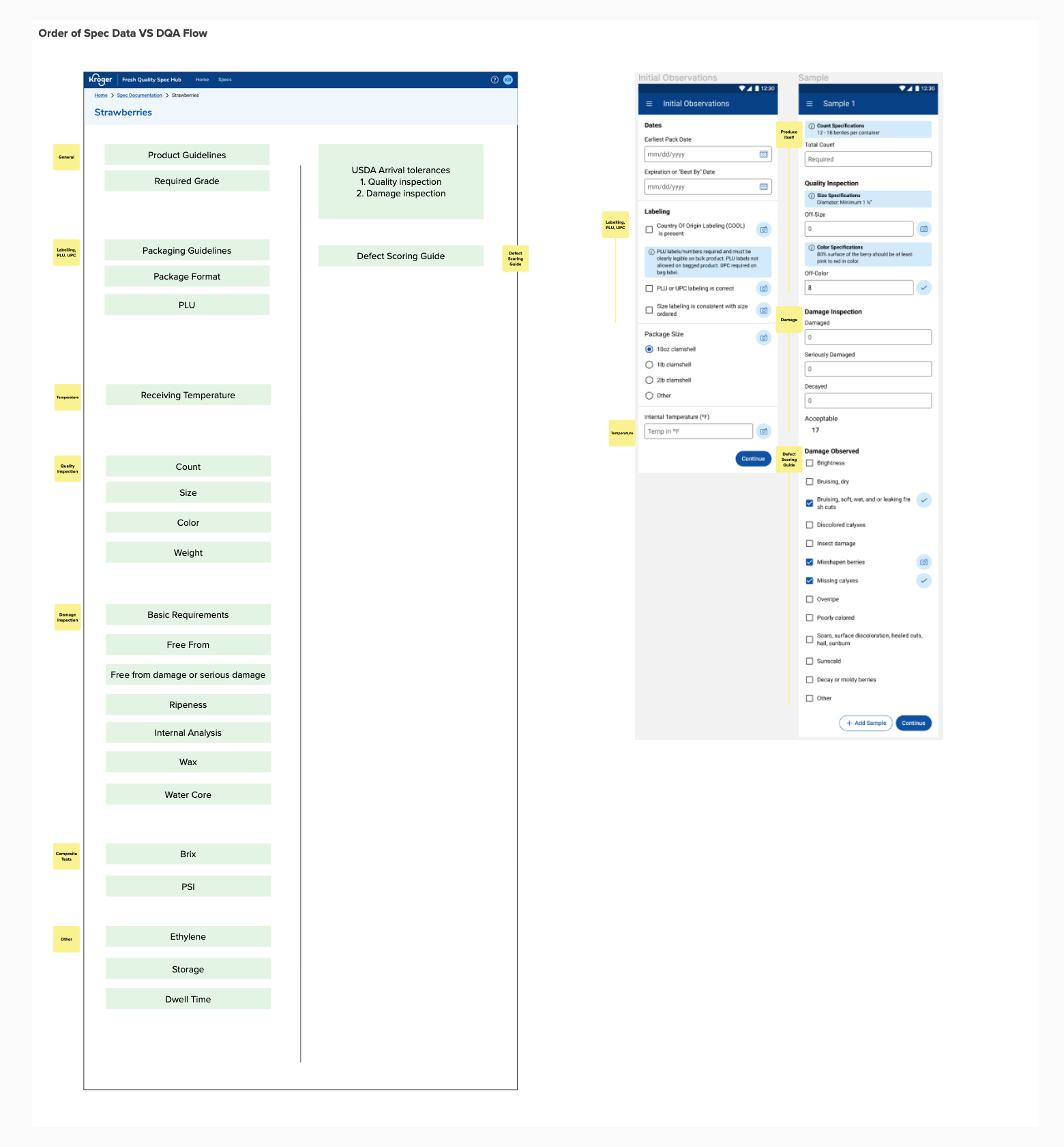
I organized the inspection workflow around incoming shipments. Instead of asking inspectors to read a printed list of loads and match them against product on the floor, the app provided a digital queue organized by load and product type. Selecting a product would launch a step-by-step inspection flow that adjusted dynamically depending on the type of produce. For example, berries triggered additional modules for sweetness measurements, but common steps like checking for damage were reused across categories.
Interaction design was a key focus. Warehouses are cold, and inspectors’ fingers are often stiff, so I created a numeric input control that allowed for both direct entry and quick increment/decrement using large plus and minus buttons. I also made sure every field displayed the unit of measure, eliminating ambiguity about whether a number referred to cases, pieces, or weight.
Another breakthrough came through UX writing. Rather than expecting inspectors to flip through the massive spec book, I embedded small pieces of contextual helper text directly into the app. For example, when checking melon seeds, the app displayed: “Cut lengthwise; acceptable seed count: 3–6.” These snippets were approved by business stakeholders and gave inspectors just enough information to proceed with confidence. The feature was a hit in testing and later inspired the creation of a separate product, Fresh Quality Spec Hub, which digitized the entire spec manual into a CMS so it could be managed, updated, and surfaced through the Directed QA app.
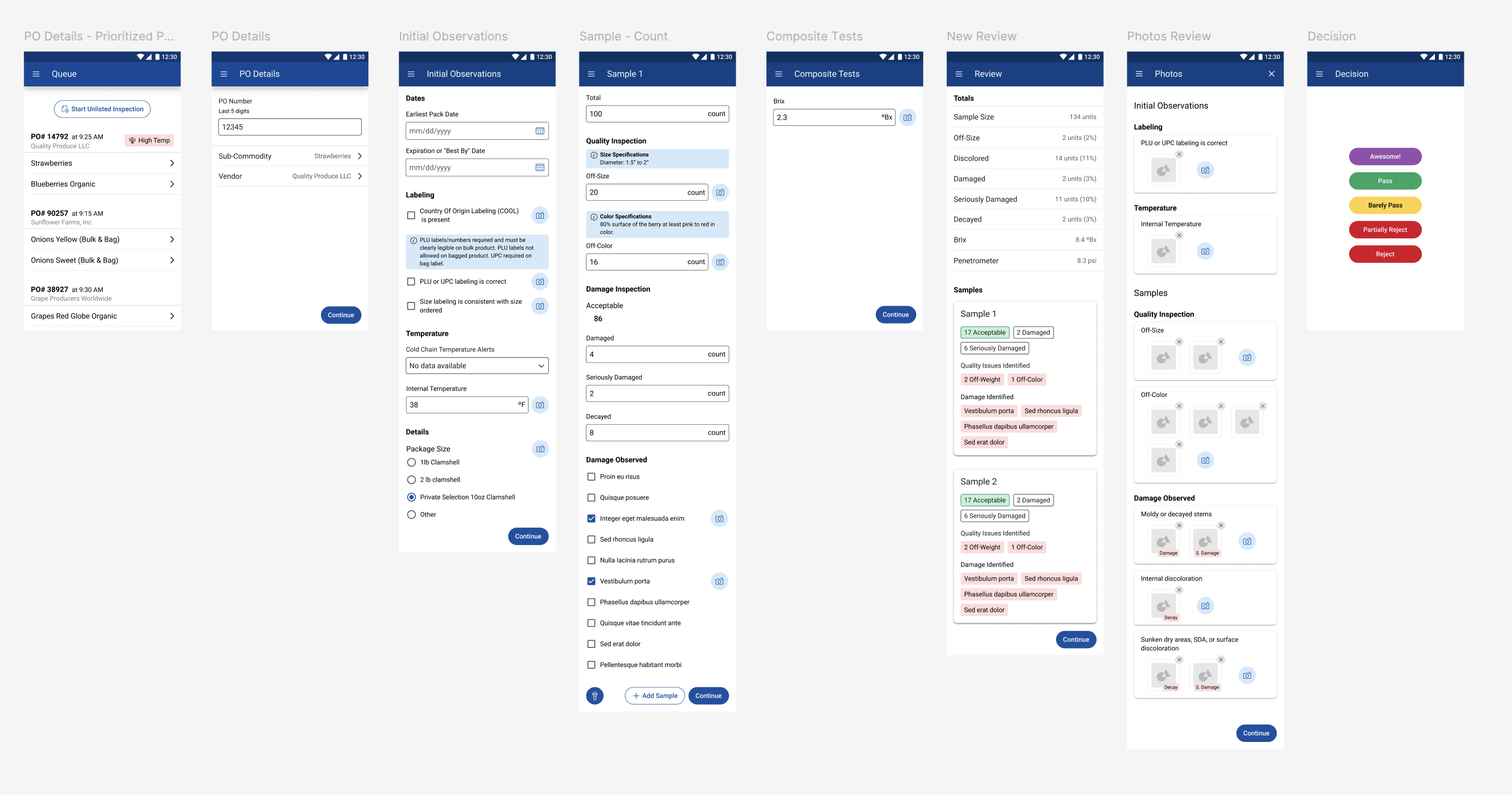
The final Directed QA app replaced paper with a guided, digital inspection process. Inspectors selected a load from a digital queue and were walked through an inspection flow that presented only the relevant modules for that product. At each step, the app captured consistent data about the total quantity inspected and the number of defects observed, supported by contextual helper text drawn from the spec. By the end of the process, the business had a standardized, digital record of inspections across all distribution centers, including accepted loads that had previously left no trace.
Since its launch in Period 8 of 2023, inspectors have completed over 1.16 million inspections in Directed QA, representing more than 546 million cases of produce and $14.3 billion in purchases. The app has flagged and rejected over 32,000 loads, preventing 7.7 million defective cases from reaching stores—a financial impact of $266 million. Beyond the numbers, the app also unified inspection practices across Kroger’s national footprint, giving leadership consistent visibility into supplier performance.
This project showed me that solving the immediate problem—digitizing inspections—was only part of the challenge. To truly empower inspectors, we needed to integrate knowledge directly into their workflow. That realization led me to advocate for and shape the Fresh Quality Spec Hub project, which became a critical companion product. It reinforced for me the importance of thinking systemically, not just about an individual app, and demonstrated how UX design can unlock business value while making life easier for users.